

API Paradigms#
REST (Representational State Transfer)
- Characteristics:
Statelessarchitecture- Uses
standard HTTP methods(GET, POST, PUT, DELETE) - Typically uses
JSONfor data exchange Resource-orienteddesign
- Pros:
- Simple and widely adopted
- Scalable and cacheable
- Separation of client and server
- Cons:
- Potential for
over-fetchingorunder-fetchingdata - Multiple round trips for complex data requirements
- Potential for
GraphQL
- Characteristics:
Single endpointfor all operationsStrongly typed schema-based queries- Allows clients to request
specific data
- Pros:
- Avoids over-fetching and under-fetching
Flexibledata retrieval- Strong typing and introspection
- Cons:
- Complex queries can impact
server performance - Always responds with
HTTP 200(error handling complexity) - Steeper learning curve
- Complex queries can impact
gRPC (Google Remote Procedure Call)
- Characteristics:
- Built on
HTTP/2protocol - Uses
Protocol Buffersfor serialization - Supports
streaming(unary, server, client, bidirectional)
- Built on
- Pros:
High performanceand low latency- Efficient
binary serialization - Strong typing with protocol buffers
- Supports
multiplexingand server push
- Cons:
- Less
human-readable(binary format) - Requires HTTP/2 support
- Limited
browser support - Steeper learning curve compared to REST
- Less
Use Cases
REST: Good for public APIs and CRUD operationsGraphQL: Ideal for complex data requirements and multiple client typesgRPC: Excellent for microservices and high-performance inter-service communication
REST#
CRUD Operations#
Basic operations of any data-driven application.
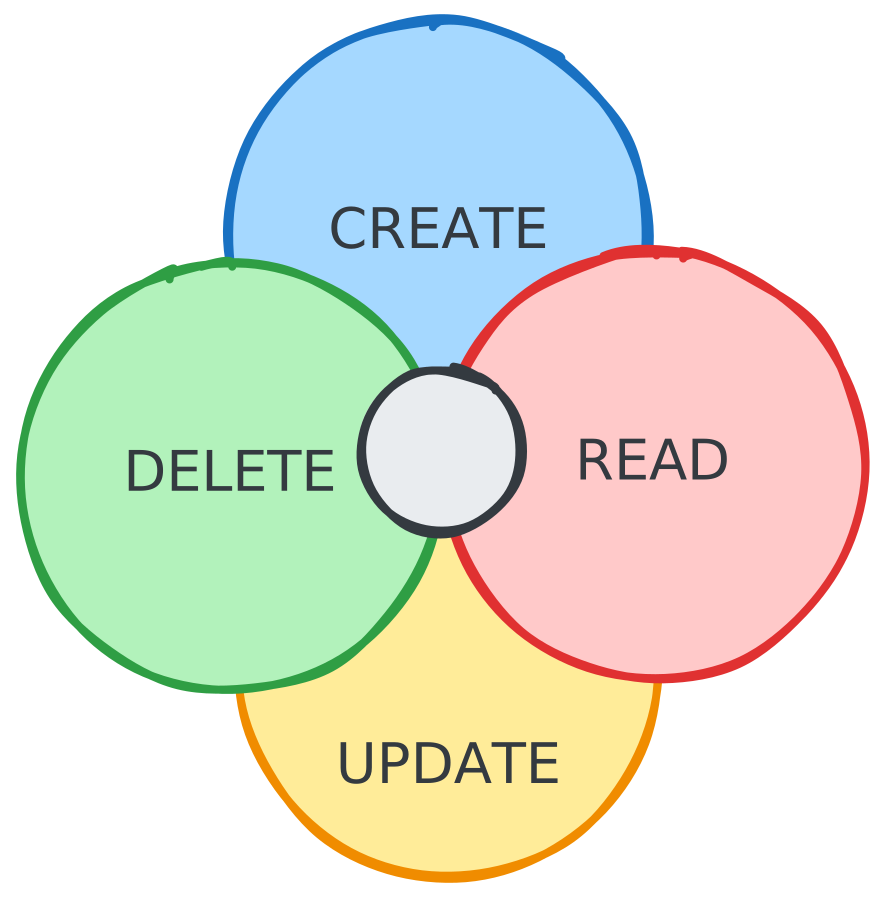
HTTP mapping:
CREATE->POST/api/productsREAD->GET/api/productsUPDATE->PUT/api/products/:idDELETE->DELETE/api/products/:id
HTTP Methods#
| Method | Safe | Idempotent | Cacheable | Description |
|---|---|---|---|---|
GET | yes | yes | yes | Retrieve a resource; never modifies state |
HEAD | yes | yes | yes | Same as GET but response body is omitted; used to check existence or metadata |
POST | no | no | conditional* | Submit data to create a resource or trigger an action |
PUT | no | yes | no | Replace the entire resource with the request payload |
PATCH | no | no | conditional* | Apply partial modifications to a resource |
DELETE | no | yes | no | Remove the specified resource |
OPTIONS | yes | yes | no | Return allowed methods and CORS headers for a resource |
CONNECT | no | no | no | Open a tunnel to the target (used for HTTPS proxying) |
TRACE | yes | yes | no | Echo the request back for diagnostic purposes |
* POST and PATCH are only cacheable if the response includes explicit freshness headers (Cache-Control, Expires) and a Content-Location header matching the request URI. In practice this is rare, most POST/PATCH responses are not cached.
Safe - does not modify server state
GET /api/products/1 - is safe fetches a product. Call it once or a thousand times, the product is never changed. The server state is identical before and after.
DELETE /api/products/1 - is not safe, it changes state by removing the resource.
Idempotent - repeating the same request produces the same result
DELETE /api/products/1 - first call deletes the product and returns 204. Second call finds nothing and returns 404. The result differs, but server state is the same: the product is gone either way. That makes it idempotent.
POST /api/products - is not idempotent, each call creates a new product, so state accumulates with every request.
POST vs PUT vs PATCH#
All three write to a resource, but differ in scope and idempotency.
Creates a new resource. The server assigns the ID, so calling it twice creates two resources.
{ "name": "Alice", "middleName": "Jane", "email": "[email protected]" }{ "id": 42, "name": "Alice", "middleName": "Jane", "email": "[email protected]" }Fully replaces a resource. Every field must be included, omitted fields are removed. Safe to retry; calling it multiple times with the same body has no additional effect.
{ "name": "Alice", "email": "[email protected]", "role": "admin" }{ "id": 42, "name": "Alice", "email": "[email protected]", "role": "admin" }middleName was not included in the request and is removed from the resource.
Partially updates a resource. Only send the fields being changed; everything else is left untouched.
{ "email": "[email protected]" }{ "id": 42, "name": "Alice", "email": "[email protected]", "role": "admin" }Only email changed. name and role were not in the request but are preserved.
| POST | PUT | PATCH | |
|---|---|---|---|
| Target | collection (/users) | specific resource (/users/42) | specific resource (/users/42) |
| Payload | new resource data | full replacement | changed fields only |
| Idempotent | no | yes | not guaranteed |
Triggering Actions#
REST is resource-oriented, but sometimes you need to trigger a process rather than create or modify a single resource. The pattern is to model the action as a resource, typically a job or task.
Instead of thinking “start a scan”, think “create a scan job”:
{ "targetId": "server-7", "type": "full" }{ "id": "scan-99", "status": "running", "targetId": "server-7" }Signals that the request was received and work has begun, but is not yet complete. The client uses the returned id to poll for progress:
{ "id": "scan-99", "status": "completed", "findings": 3 }This keeps the API resource-oriented while cleanly modelling async side effects. POST is correct here because triggering the same action twice starts two jobs, it is intentionally not idempotent.
Communication Formats#
JSON (JavaScript Object Notation)
- Characteristics:
Lightweightdata-interchange formatHuman-readableand easy to understand- Based on a
subset of JavaScript
- Structure:
- Uses
key-value pairsandarrays - Supports
nestedstructures
- Uses
- Data Types:
String,Number,Boolean,Array,Object,null
- Pros:
Wide supportacross languages and platforms- Easy to
parseandgenerate - Compact compared to XML
- Cons:
- No support for
comments - Limited
data typesupport (e.g., no date type)
- No support for
- Use Cases:
Web APIs,Configurationfiles,Data storage
XML (eXtensible Markup Language)
- Characteristics:
Markup languagethat defines a set of rules for encoding documentsSelf-descriptiveand flexible
- Structure:
- Uses
tagsto define elements - Supports
attributeswithin tags
- Uses
- Features:
Namespacesfor avoiding name conflictsDTDandXML Schemafor defining structure
- Pros:
Highly extensible- Strong
support for metadata Validationcapabilities
- Cons:
- More
verbosethan JSON or Protocol Buffers - Can be
overly complexfor simple data
- More
- Use Cases:
SOAPweb services,Configurationfiles,Data interchangein enterprise systems
Protocol Buffers (Protobuf)
- Characteristics:
Binaryserialization format developed by GoogleLanguage-neutral, platform-neutral, extensible
- Structure:
- Defines message types in
.protofiles - Strongly
typed fields
- Defines message types in
- Features:
Backwardandforward compatibilityCode generationfor multiple languages
- Pros:
Smallersize compared to JSON and XMLFasterparsing and serializationStrict typingreduces errors
- Cons:
- Not
human-readablein binary form - Requires
additional toolingfor development - Less
flexiblethan JSON or XML for dynamic structures
- Not
- Use Cases:
High-performanceRPC systems (e.g., gRPC)Inter-service communicationin microservicesData storagewhere space efficiency is crucial
Comparison
JSON: Best for web applications and APIs where human readability is importantXML: Suitable for complex data with metadata requirements and where extensive tooling support is beneficialProtocol Buffers: Ideal for high-performance scenarios and when working with strongly typed data in multiple languages
Versioning#
To ensure redesigns or changes don’t break existing functionality, implement versioned URLs for different API versions.
REST API Versioning
- Current Version:
/api/v2/products- Serves current clients
- Latest features and improvements
- Legacy Version:
/api/v1/products- Serves older clients
- May be deprecated in future